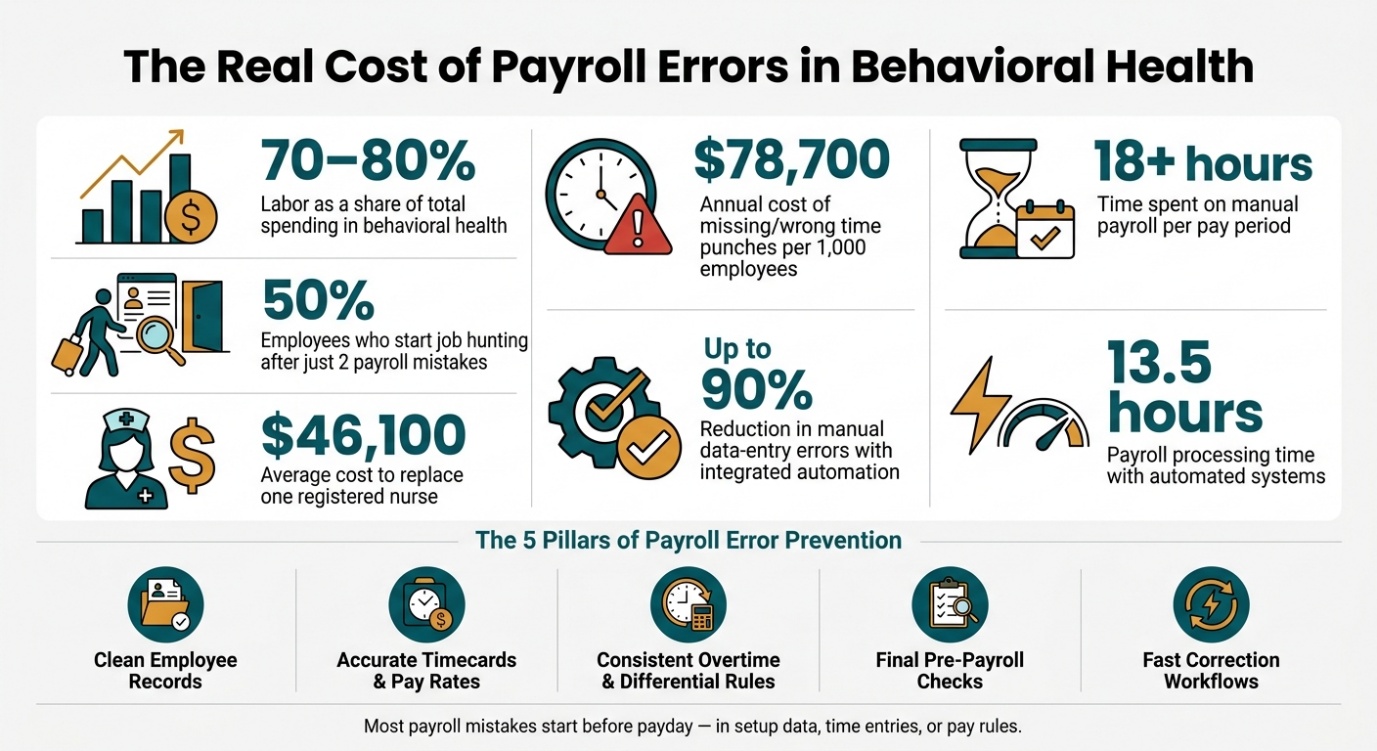
Payroll errors cost more than a bad paycheck. In behavioral health, labor can account for 70% to 80% of operating expenses in behavioral health, so even one payroll mistake can hit pay, taxes, overtime, staffing, and retention at the same time.
If I wanted to stop payroll errors fast, I’d focus on five things:
- Clean employee records before payroll starts
- Accurate timecards and pay rates for every shift and role
- Consistent overtime and differential rules
- Final checks before payroll is approved
- Fast correction steps when something still goes wrong
Here’s why this matters: 49% of employees start job hunting after two payroll mistakes, manual payroll can take 18+ hours per pay period, and replacing one registered nurse can cost roughly $46,100, according to industry estimates. That turns “small” payroll issues into staffing and budget problems.
I’d sum up the article like this: most payroll mistakes start before payday, usually in setup data, time entries, or pay rules. The fix is simple in principle: get inputs right, apply rules the same way each pay cycle, review exceptions before payroll closes, and document every correction.
That’s the whole playbook in plain terms.
Fix payroll inputs before problems reach payday
Most payroll mistakes don't start on payday. They start earlier - in employee records, timekeeping, or pay-rate setup.
Employee records, classification, and tax setup
Bad employee data is one of the most common payroll trouble spots, and it often gets missed. A per-diem counselor marked as a contractor instead of an employee can lead to unpaid overtime and the wrong tax withholding. That risk gets even higher in behavioral health, where people often move between sites, programs, or roles in the same pay period. Each change can bring different pay rules or classification rules.
Duplicate and inactive records cause a different kind of mess. If a terminated residential tech stays active in the system, payroll may keep paying them. If the same employee has two records with different pay rates, the result can be double payments or uneven pay.
A standard onboarding checklist helps stop these problems early. Before a record goes live, require every core field:
- Legal name
- SSN
- Start date
- Job classification
- Tax withholding
- Direct deposit
- Benefit elections
Quarterly audits of active records, tax settings, and bank details help catch what slips through. Tax setup errors are expensive to clean up and can lead to penalties.
Timecards, attendance, and pay-rate accuracy
Split shifts, overnight work, and late approvals make time errors easy to miss. Missing punches, delayed signoff, undocumented manual edits, and wrong job codes all flow straight into paycheck calculations. Missing or wrong time punches cost about $78,700 per 1,000 employees per year.
Pay-rate mistakes add another layer. If a behavioral health technician works night shifts and the differential isn't added, their net pay will be short. Problems in benefit and deduction setup - like the wrong health plan premium or a missed retirement contribution - can do the same thing. Clean employee records and solid timekeeping stop many of these issues before payroll even begins.
Here are the main input errors and the controls that help prevent them.
| Error Source | Business Impact | Prevention Control |
|---|---|---|
| Missing or incorrect time punches | Understated or overstated hours, overtime miscalculations, employee dissatisfaction, and potential wage-and-hour claims | Automated time capture with punch validation, daily review, and supervisor approval before payroll cutoff |
| Worker misclassification (exempt vs. non-exempt, contractor vs. employee) | Unpaid overtime, incorrect tax withholding, wage-and-hour penalties | Classification checklists, HR/legal review for edge cases, and periodic audits |
| Outdated addresses and tax settings | Wrong state or local withholding, amended filings, and catch-up deductions | Self-service address updates with automated tax jurisdiction assignment and quarterly data reviews |
| Outdated pay rates or missed shift differentials | Systematic underpayment or overpayment, retro pay calculations, and employee morale issues | Effective-dated rate changes integrated between HR and payroll, with exception reporting for unusual pay patterns |
| Benefit and deduction setup errors | Unexpected net pay changes and legal risk if statutory deductions are misapplied | Regular reconciliation of deductions against enrollment records and carrier data |
Errors found before payroll runs are cheaper and easier to fix. Once the inputs are clean, the next job is making sure pay rules are applied the same way every time.
Apply pay rules consistently across shifts, roles, and adjustments
Once employee records and timecards are clean, payroll can still go off track if pay rules change from one shift, role, or adjustment to the next.
Overtime, shift differentials, and special pay structures
Under the FLSA, overtime has to be based on the regular rate, not just the base rate. That regular rate includes shift differentials, on-call stipends, bonuses, and other eligible premiums.
Things get messy fast when someone works in more than one role or location during the same week. Say an employee works 32 hours in one role and 10 in another. Overtime has to be based on total hours and total earnings, not each role on its own. That’s why timekeeping and scheduling data need to match before payroll is finalized. The same issue shows up when differentials and bonuses change the regular rate.
Shift differentials are another common trouble spot. Errors happen when the premium is tied to the schedule instead of the hours the person actually worked, or when departments follow different rules with no written policy to back them up. A pay-rule matrix should spell out when a differential starts and stops, which roles qualify, whether partial shifts count, whether the premium applies to all hours or only the qualifying hours, and how it affects overtime.
The same goes for other premium pay, like on-call stipends, callback pay, crisis-response premiums, preceptor or lead differentials, travel time, and training pay. If supervisors approve these on the fly, without a standard pay code or a clear process, payroll reviewers are left guessing. And guessing is where errors creep in.
Use one pay-rule matrix to keep these cases consistent.
| Pay-Rule Scenario | Common Error | What to Do Instead |
|---|---|---|
| Hourly – Overtime | Calculated on base rate only | Include differentials and nondiscretionary bonuses in the regular rate |
| Salaried nonexempt – Overtime | Assumed exempt; overtime skipped | Verify classification; nonexempt salaried staff can still earn overtime |
| Multi-role employee | Hours calculated separately per role | Use a blended rate across all hours and earnings |
| Standard vs. differential pay | Differential applied to scheduled shift, not hours worked | Trigger premiums based on actual clock-in/out times, not the schedule |
Retro pay and late changes after the pay period closes
Late changes need the same kind of control. Promotions, backdated raises, missed shifts, or credential fixes all need a standard retro-pay process.
Retro pay means going back through each affected pay period, recalculating pay with the correct historical rate, and recording the effective date, approval, and reason for the change. When that approval trail is missing, teams often handle recalculations by hand. That’s where one-off decisions start to pile up.
A formal process helps keep this clean:
- Log the effective date
- Identify every affected pay period
- Recalculate with the correct historical rules
- Require manager sign-off before processing the adjustment
- Make late edits visible in payroll for review
That last point matters. If reviewers can’t see the late change clearly, they can’t confirm that the adjustment was handled the right way.
Less admin.
Stronger teams.
Better client outcomes.
See how behavioral health organizations streamline documentation, staffing, and client engagement with ContinuumCloud.
Which solution would you like to explore?
Build payroll controls that catch errors before payroll is finalized
After inputs and pay rules, the last risk point is the payroll review window itself. Even when inputs look clean and pay rules stay consistent, errors can still slip through. That’s why a final review before payroll is finalized matters.
Pre-payroll checks and approval workflows
Use a standard pre-payroll check to flag:
- Missing approvals
- Outlier hours or pay
- Duplicate earnings
- Tax gaps
- Zero or negative net pay
- Variance by program or cost center, including unexpected spikes in overtime or gross pay at a single location
Split time approval, HR validation, and payroll review into separate steps. The person who prepares payroll should not be the one who approves it. That separation helps catch mistakes before they turn into paycheck issues.
A tiered cutoff also helps keep things orderly: employee entry, supervisor approval, then payroll review. In behavioral health, schedules can change fast, and last-minute fixes are part of the job. But those fixes need a controlled path, not a side-door workaround. Route each correction through a documented exception path with a reason, approver, and timestamp.
Once exceptions are cleared, every change should still leave a traceable record.
Audit trails, exception review, and access controls
Every edit to a timecard, pay rate, tax setting, or deduction should be logged automatically, including who made the change and what changed. For sensitive overrides, require a comment field. That adds accountability. A spreadsheet may seem simple, but it does not create a defensible audit trail.
Access should match the person’s role:
- Employees should only see and edit their own time
- Supervisors should only manage their direct reports
- Senior payroll or finance roles should handle overrides, new earning codes, and off-cycle payroll
Review manual adjustments, timecard overrides, and late approvals each month by program and supervisor. That makes repeat issues much easier to spot before they become a pattern.
Fix payroll errors quickly and reduce repeat issues with automation
Even with clean inputs and solid controls, some payroll mistakes still slip through. When that happens, you need a repeatable process, not a patchwork fix. If the process changes every time, the same error often shows up again. A clear four-step workflow helps keep corrections clean, trackable, and easy to defend.
A step-by-step workflow for correcting payroll mistakes
- Identify the scope
Before you change anything, figure out how many employees were affected and what kind of error happened. It could be the wrong pay rate, a missed shift differential, a timecard problem, or a pay rule set up the wrong way.
- Recalculate affected pay
Pull the actual inputs: hours by shift, base rates, differentials, and any overtime that applies. Then recalculate gross pay using the right rules. Keep that separate from tax withholding calculations. And don't key it back in by hand - use system calculations.
- Document the correction
Record the discovery date, the error type, the pay periods affected, how the corrected amount was calculated, who approved it, and when payment went out. Where required or appropriate, document the correction clearly on the employee's pay statement.
- Review the root cause
After the correction is processed, trace the issue back to the point where it started. Was it a bad timecard entry? A missing approval? A pay rule that wasn't set up for a certain role? This step is what turns a one-off fix into a lasting change.
Choose on-cycle, off-cycle, or retroactive based on impact. The table below shows when each option makes sense.
| Correction Type | When to Use | Required Documentation |
|---|---|---|
| On-cycle | Minor errors that don't cause hardship and can wait for the next scheduled pay run | Updated timecard or rate record, approval log, corrected payroll register, employee notification |
| Off-cycle | Major underpayment, missed overtime, or errors that miss required pay deadlines or minimum wage rules | Calculation record, off-cycle justification, HR/finance approval, off-cycle payroll report, audit trail entries, employee communication |
| Retroactive | Late rate changes or credential-based pay updates affecting prior periods | Recalculation logs, original and corrected payroll registers, approval record, pay stub documentation |
Off-cycle runs create extra admin work and may come with processing fees, but sometimes they're the right move. If an error has a material effect on pay, waiting can make the problem worse.
Correction matters. Automation cuts down how often you have to do it.
How integrated payroll automation improves accuracy and efficiency
Integrated systems stop upstream mistakes before they hit payroll. When HR records, timekeeping, and payroll all use one data model, a pay rate change entered in HR flows straight into payroll without manual re-entry. Time data captured at the punch level moves into payroll through rule-based engines, so there’s no spreadsheet import, no copy-paste, and fewer chances for mismatched data. Automated systems can reduce manual data-entry errors by up to 90% and cut payroll processing time from 18+ hours per pay period to around 13.5 hours.
And here's where this starts to pay off in day-to-day work: once a correction reveals a pattern, connected systems help stop that same issue from happening again. Exception reports, approval workflows, and audit trails work better inside one system because the data already lines up. If a correction is needed, the system can rerun calculations across all affected employees, create a targeted adjustment run, and log every change with a timestamp and approver name.
Clean inputs, clear rules, strong controls, fast corrections, and integrated systems all support each other. Put them together, and you get a full payroll error prevention system.
FAQs
What payroll errors are most common?
Common payroll errors in behavioral healthcare usually start with manual work, disconnected systems, and pay rules that get messy fast.
That often leads to issues like:
- Missing or wrong time punches
- W-4 setup errors
- Overtime, vacation, or shift differential miscalculations
On top of that, many organizations run into retroactive pay problems and data sync errors between systems. And those mistakes don't just stay in payroll. They can lead to IRS payroll tax penalties, audit risk, and even denied clinical billing claims.
How often should payroll data be audited?
There’s no fixed audit timetable here. But payroll data should still be checked on a routine basis so teams can review labor histories and funding allocations.
Here’s the issue: manual work can let mistakes sit quietly for months. That’s why routine monitoring and real-time audit trails matter. They help cut compliance risk and keep documentation ready for review.
When should a payroll error be fixed off-cycle?
An off-cycle payroll check is usually used to fix a payroll mistake after it has already happened.
In plain English, it’s a manual payment that an organization uses to correct a pay issue and help an employee when a paycheck error comes to light. The source does not set a hard cutoff for when an employer should use an off-cycle check instead of waiting for the next pay period.